Your coding agent tests your site on iPhone, Android and laptop. Beta
Turn on Breakpane's MCP server and connect the agent you already use: Claude Code, Codex and Cursor connect with one click, and any other MCP-compatible tool works too. The agent opens your site side by side, floating over your editor, then taps, types, scrolls, takes screenshots and audits the responsive layout. It only acts on the devices it opened.
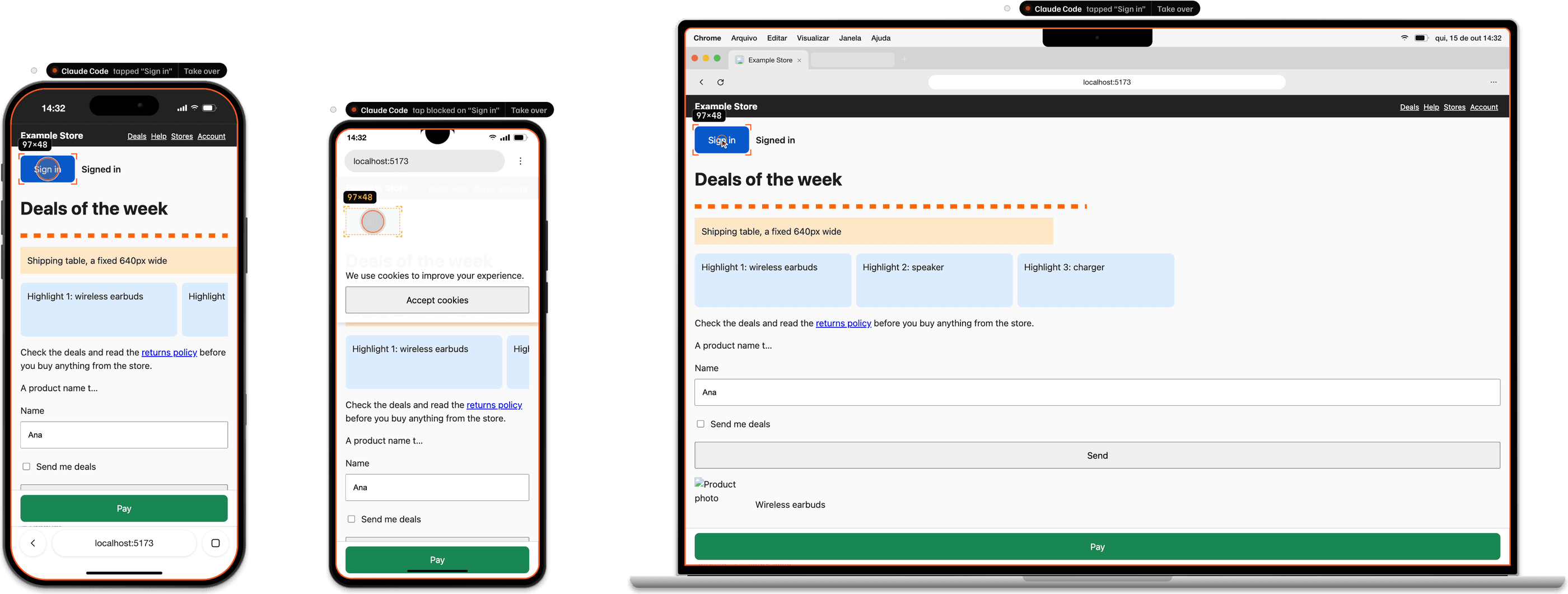
- iPhone 17 Pro402×718 · Browsertapped “Sign in”: ok
- Galaxy A06360×716 · Browser“Sign in” covered by div.cookie
- MacBook Air 13″1470×838 · Browsertapped “Sign in”: ok
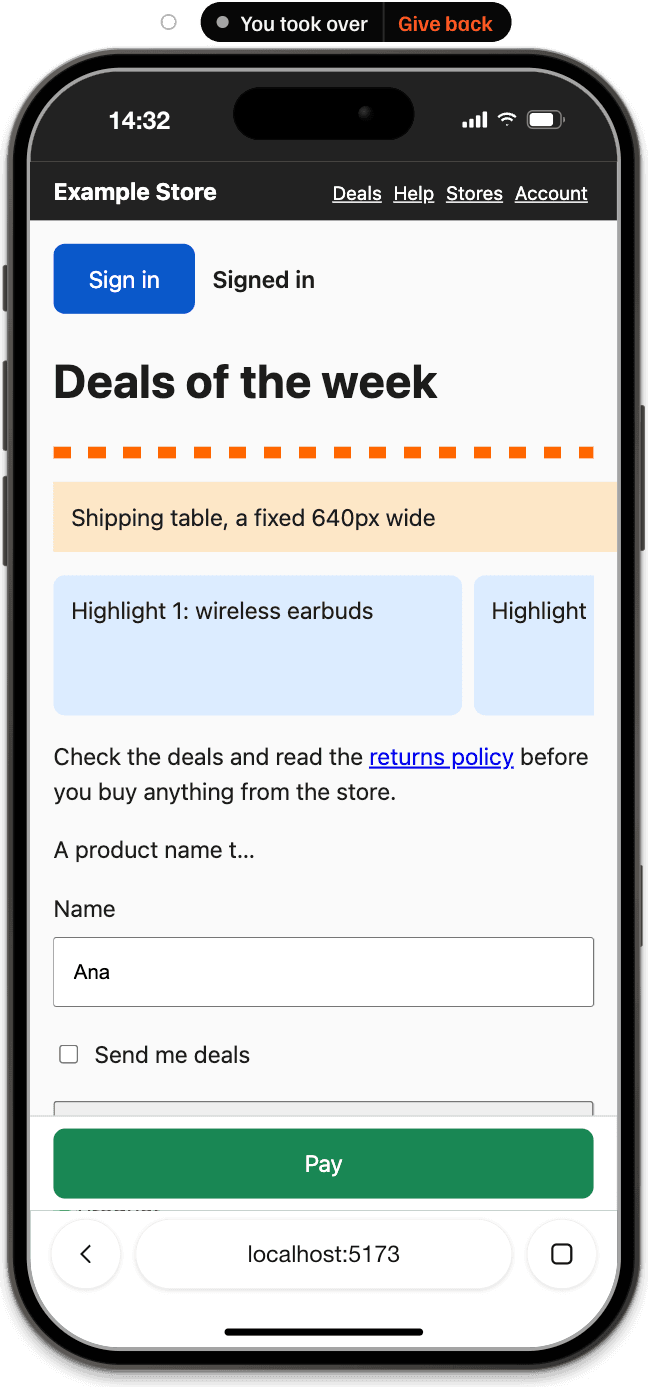
You see every action. And take over whenever you want.
A tap shows up as a finger, with the target marked and measured; when another element covers the button, the corners turn amber. Scrolling leaves a trail, screenshots flash and the audit sweeps the screen. Click an agent's device, or use Take over on its label, and it stops acting there until you click Give back. It can still see the page and keeps working on the others.
One button per tool.
1 of 3
Turn it on
On the Coding agents button next to the device, turn on Allow coding agents. The status line reads 127.0.0.1:47821 · on.
2 of 3
Connect
Click Connect on the tool you use. Breakpane creates a key just for it and writes the setup; if it can't, it copies the configuration and tells you.
3 of 3
Paste
Open a new conversation in the tool and paste one of the Start here prompts. On each agent's first action, Breakpane asks whether you allow it.
With one click, Connect sets up
- Claude Code
- Runs claude mcp add in user scope, with your shell's PATH. The key never goes into a project file.
- Codex
- Writes the Breakpane block into ~/.codex/config.toml, after saving a copy of the file.
- Cursor
- Adds Breakpane to ~/.cursor/mcp.json without touching your other servers.
- VS Code
- Opens the install link, and VS Code itself asks you to confirm. Works with Copilot's agent mode.
- Windsurf
- Adds Breakpane to the mcp_config.json of Windsurf or Devin Desktop.
- Claude Desktop
- Copies the setup for you to paste into claude_desktop_config.json.
Use another tool? Any MCP client over HTTP that can send an authorization header works: Copy configuration gives you the block to paste. A file with a syntax error is never overwritten.
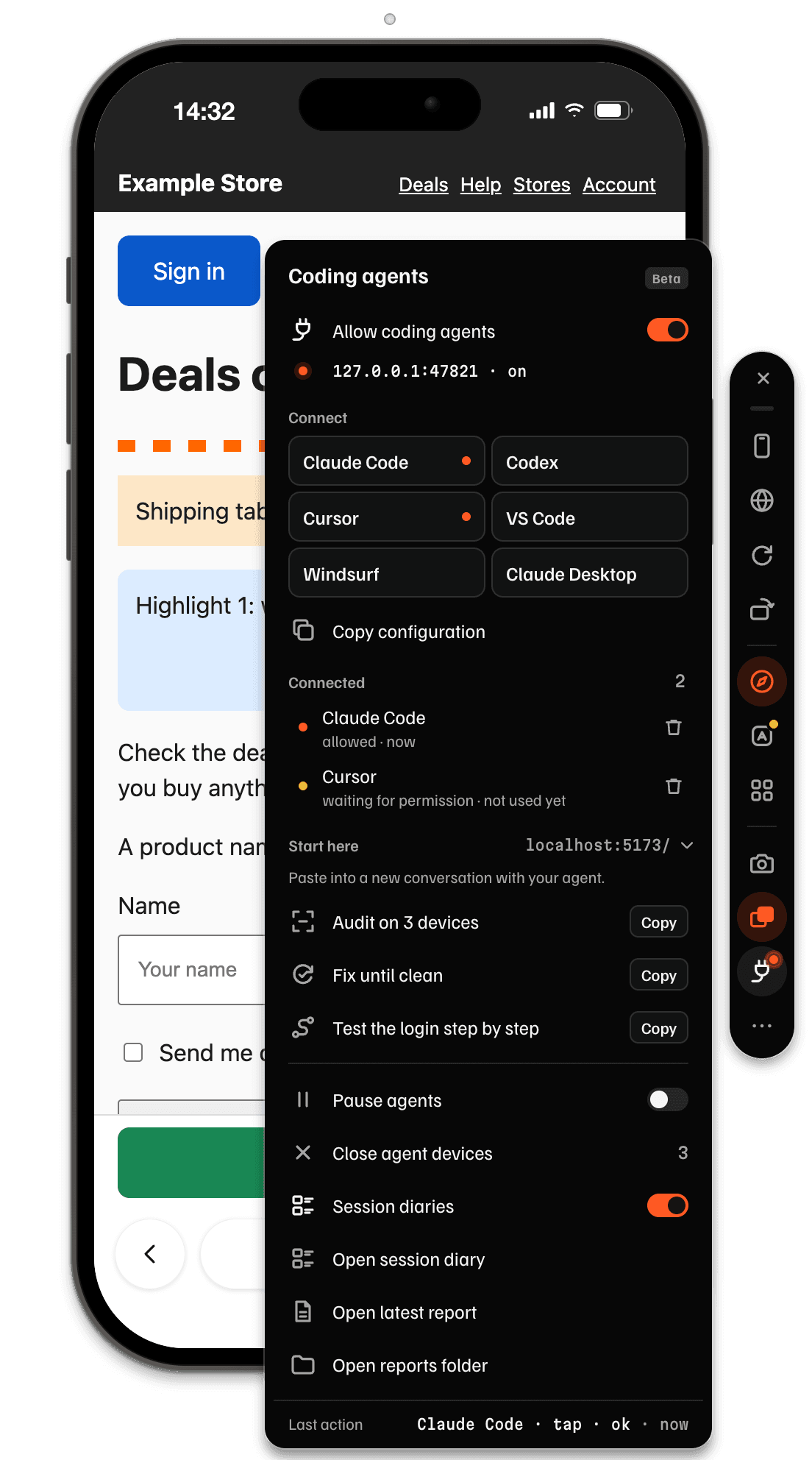
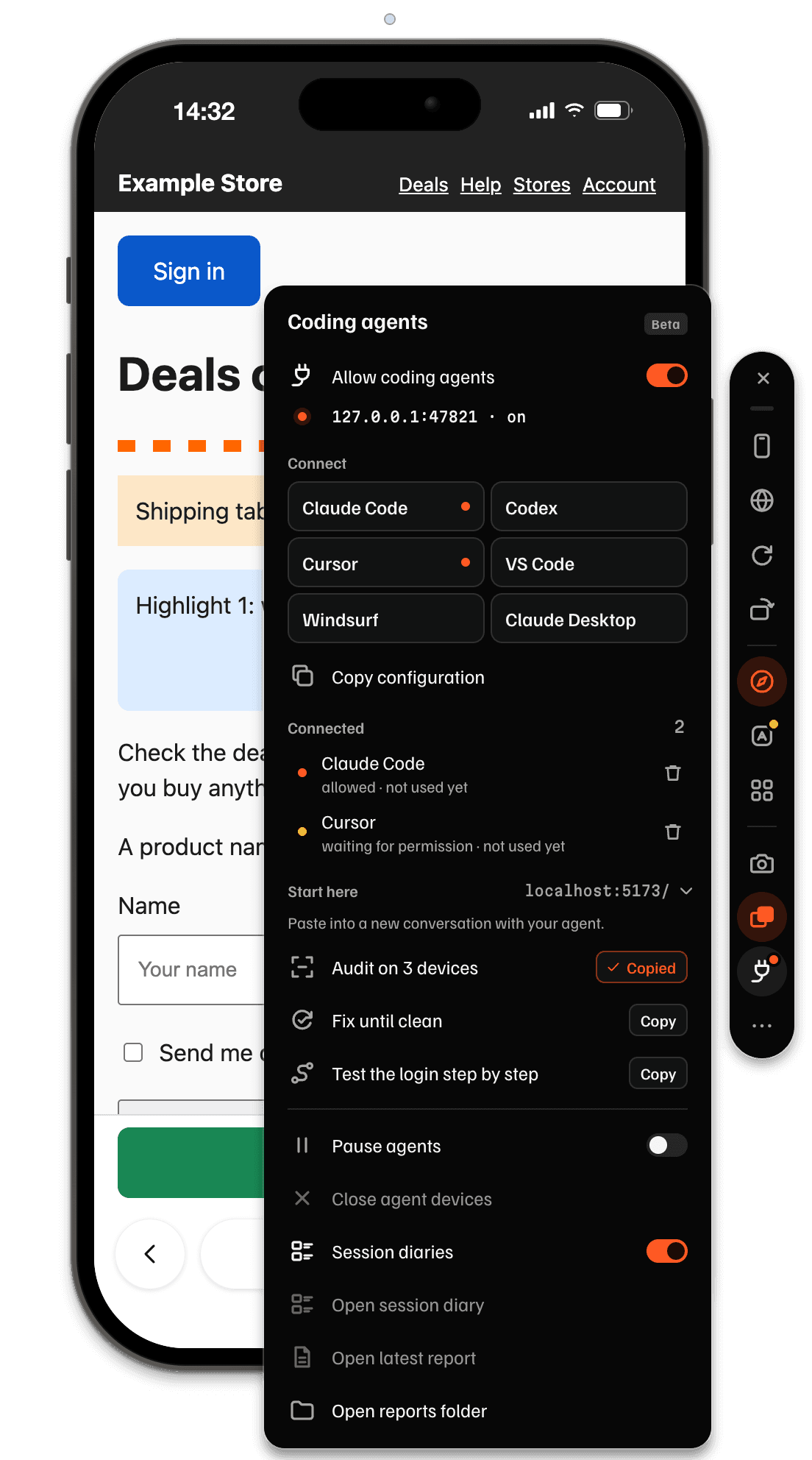
Three ready prompts, already carrying your site's address.
- Audit on 3 devices
- Opens it on iPhone 17 Pro, Galaxy A06 and MacBook Air 13", audits and lists every problem, worst first, with the fix in the code.
- Fix until clean
- Audits, fixes the project's code, reloads and audits again, until no project error is left or for at most 5 rounds. It stops to ask when a fix needs a product decision.
- Test the login step by step
- Walks through the login on an iPhone and an Android, with a screenshot per step. It asks for test data and never uses real personal data.
In Claude Code, the same prompts are also commands: /mcp__breakpane__test_site, /mcp__breakpane__fix_until_clean and /mcp__breakpane__test_flow.
A prompt copied from the panel carries only the origin and path of the address, never query parameters or anything after the #.
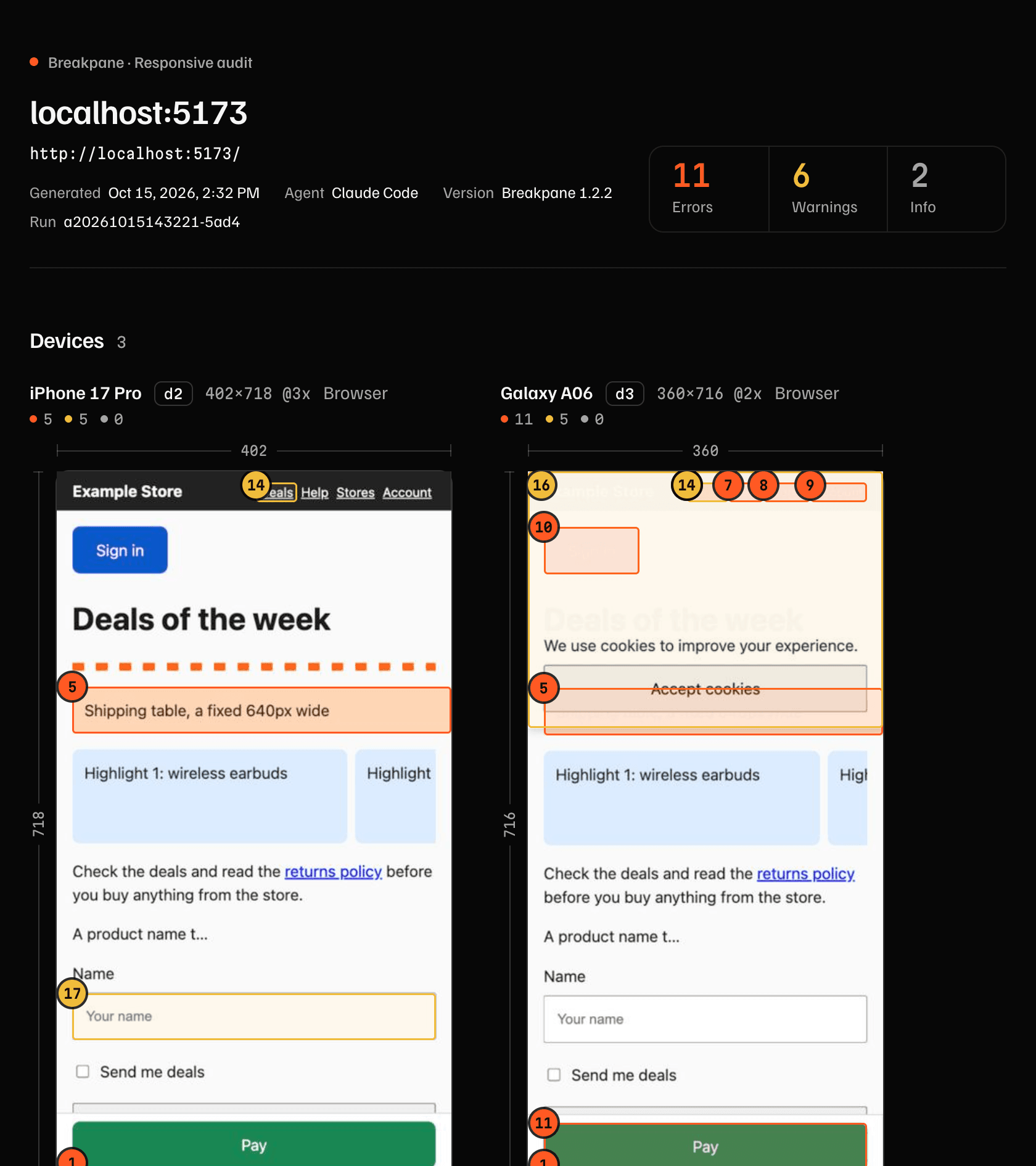
The audit becomes a report. The session becomes a diary.
On every device, the audit looks for content that scrolls sideways, content under the status bar, the notch or the home indicator, small or covered tap targets, clipped text, broken images, console and network errors and what the PWA is missing. The agent gets the numbered list with the code, the selector and the measurement for each problem; the fixes are in report.json, next to the report. You get an HTML page with the problems numbered on the screenshots.
Every agent session also saves numbered screenshots and a Markdown summary to paste into a pull request, without typed text or URL parameters.
Both stay on your computer. In the Coding agents panel: Open latest report and Open session diary.
Worth knowing before you turn it on.
- Only on your computer
- The server listens on 127.0.0.1 only and checks who is calling: web pages can't talk to it, and the firewall never asks. Screenshots and page text go to your agent; from there, its own rules apply.
- Your devices stay yours
- Each agent acts only on the devices it opened, marked with the orange outline. Yours show up for it only as a name and an address.
- You decide
- It starts off, and each tool gets its own key. Pause agents, in the panel or the tray, refuses the next actions right away; the trash button deletes the key and closes that agent's devices.
- The same logins
- Agent devices share your devices' sessions, so you can test flows behind a login. Remote sites get no camera, microphone or location, and downloads are cancelled.
- On Windows
- You can't type into a device an agent opened: it never takes the keyboard, so your editor keeps its focus. To take it over, click it or use Take over. Even when taken over, it only gets clicks and touch. Your own devices work as usual.
- Chromium engine
- Pages run in Chromium, like everywhere else in Breakpane: the audit finds layout and touch problems, not WebKit bugs.
About agents.
Which coding agents does it work with?
Breakpane runs a local MCP server for mobile testing, so it works with any MCP-compatible tool over HTTP: Claude Code, Codex, Cursor, VS Code (Copilot), Windsurf, Claude Desktop and others. The most popular ones connect with one click; for the rest, Copy configuration gives you the block to paste. Then paste a Start here prompt into a new conversation; in Claude Code they're also commands, like /mcp__breakpane__test_site. It's in Beta and works during the trial and with a subscription.
Can the agent touch my devices?
No. Each agent only acts on the devices it opened itself, marked with an orange outline; yours show up for it only as a name and an address. On its devices, you take over whenever you want: click one and the agent stops there until you click Give back. The server listens only on 127.0.0.1, each tool has its own key and the first action asks for your permission.
What does the agent get from the page?
What it asks for: screenshots, the accessibility tree, the page text, the console, the network and the audit list. That goes to the agent, and from then on your tool's rules apply. The session diary stays on your computer, without typed text and without URL parameters.
Do agents cost extra?
No. Coding agents are in Beta and come with every plan, including the 14-day trial. They only stop working when the trial or subscription has ended, like the rest of the app.
Breakpane runs on your computer.
You're on your phone. Send the link to your email and open it on your Mac or PC when you sit down to code.
Mac with Apple silicon or Intel and Windows 10 and 11. We use the email only to send this link, once, and don't keep it.
14 days free
Download and try it free for 14 days.
No card, everything unlocked. On day 3, we only ask for your email. After that, from $9 a month.
New in 1.2.10: Coding agents no longer ask to reconnect, open Breakpane when it is closed and keep each conversation's devices apart. see what's new
1 of 3Pick your system
2 of 3Download
3 of 3The first time you open it
On the Mac, the app is signed and notarized by Apple, so macOS just confirms you want to open an app downloaded from the internet. On Windows, from the Microsoft Store, there's no warning.
- Open the .dmg and drag Breakpane to the Applications folder.
- Double-click Breakpane. macOS asks if you want to open an app downloaded from the internet. Click Open.
- That's it. It shows up in the menu bar, not in the Dock.
- On the Microsoft Store, click Get. Windows downloads and installs it on its own, with no warning.
- Open Breakpane from the Start menu. It lives in the system tray, next to the clock.
Downloaded the .exe?
- Run Breakpane-Setup-1.2.10.exe.
- On the blue Windows protected your PC screen, click More info.
- Click Run anyway.
- That's it. Breakpane lives in the system tray, next to the clock.
With the installer in your Downloads folder (the Windows default), one PowerShell command removes the downloaded-from-the-internet mark and opens the installer without the blue screen, skipping steps 2 and 3. If it's in another folder, change the path in the command or follow the steps above.
Unblock-File "$HOME\Downloads\Breakpane-Setup-1.2.10.exe"; Start-Process "$HOME\Downloads\Breakpane-Setup-1.2.10.exe"

File details and security
SHA-256Breakpane-1.2.10-arm64.dmg
712c0cffd5af54d7e5d4052884c9ba65763709f92e80812cc3066441a7379f49Check it in Terminal: shasum -a 256 Breakpane-1.2.10-arm64.dmg
SHA-256Breakpane-1.2.10-x64.dmg
6b448c72dace1a40fd358be28d7693b3d5448e5adc526e6b1b268d3de5464308Check it in Terminal: shasum -a 256 Breakpane-1.2.10-x64.dmg
SHA-256Breakpane-Setup-1.2.10.exe
3861993aaf524ad3f3faa3404099dd9be03e02465872264608933721bd8f9bb0Check it in Command Prompt: certutil -hashfile Breakpane-Setup-1.2.10.exe SHA256
What you can check
The download comes only from here, the Microsoft Store and Breakpane's GitHub Releases. There are no mirrors.
The app sends nothing about your projects or the pages you open. The anonymous daily usage count can be turned off in More options.
On the Mac, the app is signed and notarized by Apple. On Windows, the Microsoft Store checks the package before publishing it.
Files in v1.2.10
- Mac with Apple siliconBreakpane-1.2.10-arm64.dmg130.5 MB
- Mac with IntelBreakpane-1.2.10-x64.dmg137.4 MB
- Windows 10 and 11Breakpane-Setup-1.2.10.exe111.1 MB
- Previous versions, notes and checksums on GitHub Releases
- Changelog
- Linux? Not yet. Ask for it on GitHub.
Questions? support@breakpane.com